
Helios / User guide / Git review and checkpoints
Git review and checkpoints
Review Helios Git diffs, stage individual hunks, send feedback, commit, push and use checkpoints with the right recovery expectations.
Helios 0.114.4 · Source reference ↗
Inspect the current repository
Choose Changes in the workspace selector. The pane shows the Git repository’s current changes, including changes from another chat, your editor or a terminal in the same folder.
Files are grouped into Staged and Unstaged changes. Read the diff before acting. A separate chat does not isolate files; use an opt-in worktree for independent experiments.
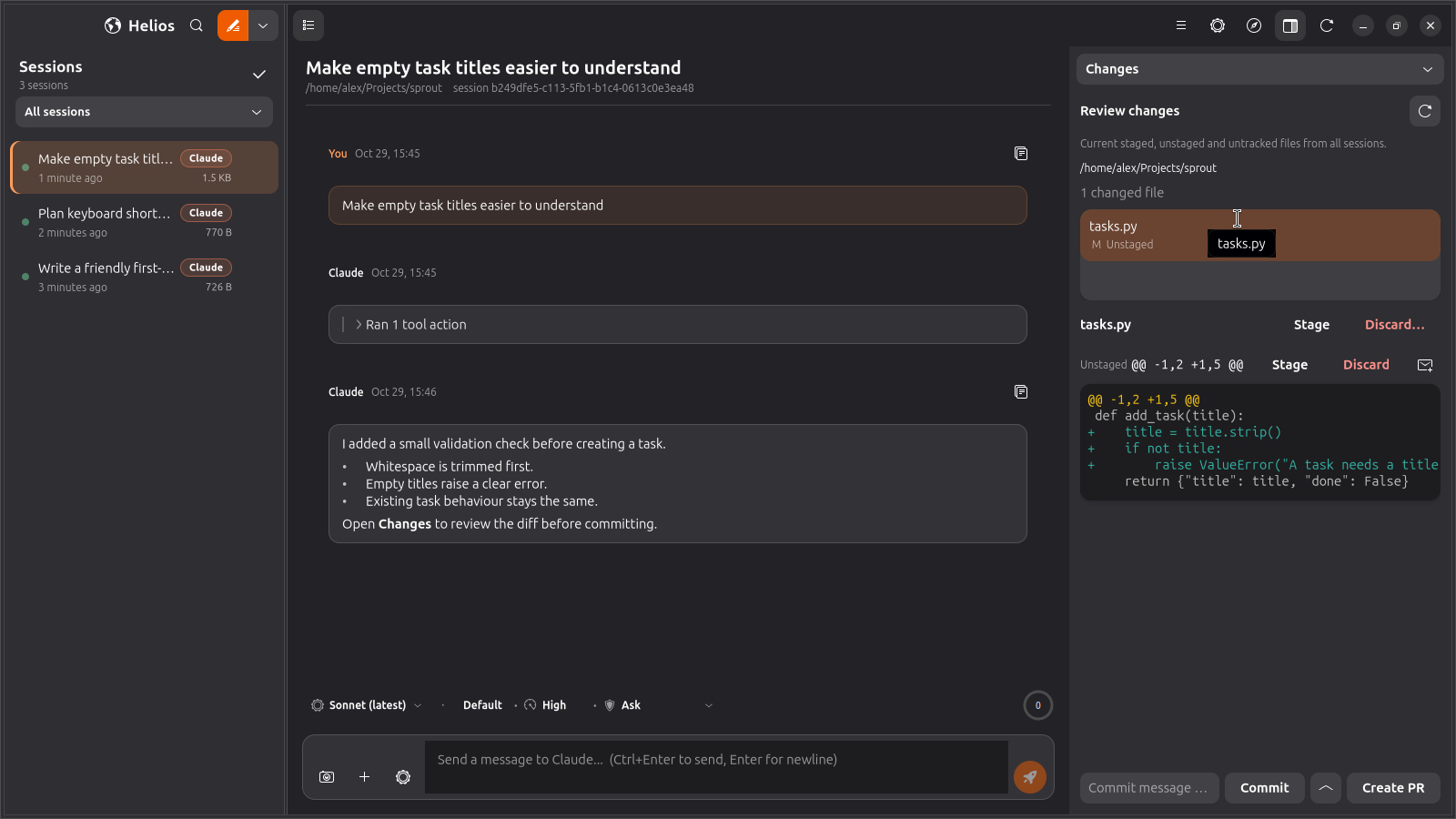
Stage, unstage and discard
Each diff is split into hunks. Stage or unstage an individual hunk when only part of a file belongs in the change. File-level controls act on the whole file.
Discarding asks for confirmation. A discarded tracked change is replaced through Git; an untracked file goes to the desktop trash. Read the selection before confirming and keep an independent backup of work you need to retain.
Send review comments to the agent
- Open the comment control beside a relevant hunk.
- Write a specific request, such as “Keep the existing error wording for non-empty input.”
- Add any other hunk comments.
- Use Send N comments to agent to deliver them as one message to the conversation you are viewing.
Check the active chat before sending. Review comments use the normal message path, so they can queue behind a running turn.
Commit, push and open a review
The pane’s bottom bar can commit staged changes and push the current branch. A first push can establish the branch’s upstream.
Opening a pull or merge request uses gh or glab in a terminal. Install and sign in to the appropriate CLI first. Repository rules and remote review checks still apply.
Run the project’s relevant tests before committing. Stage only the changes you intend to include, give the commit a useful message and verify the branch and remote before pushing.
Recover with checkpoints
In a Git repository, Helios attempts a file snapshot before each sent message. It records a dangling Git tree without moving your branch, refs or staging index. Git-ignored files are excluded.
Choose Rewind files… from the app menu to inspect available checkpoints. A saved user message’s menu can open the checkpoint before that message. Files displaced by a restore are moved into checkpoint-trash/ under the app’s state directory.
A checkpoint can be unavailable outside a repository or when snapshotting takes too long; Helios then sends the message with a notice. Checkpoints are a convenience for captured project files. Keep normal commits and backups for reliable recovery.
Conversation history and project files
Forking a conversation creates a new history branch. Rewinding files restores a captured filesystem state. Review both when trying a different approach; changing one does not automatically change the other.
The current generic agent-command Revert action is unavailable. Use the actual Changes and Rewind controls, with the information they show.