
Indigo runs Gecko codes: cheats that change a game while it runs, from infinite health to widescreen fixes. You switch them on per game, and Indigo remembers your choice.

Get cheat files
Indigo reads one file per game, /swiss/cheats/<game ID>.txt, such as
/swiss/cheats/GALE01.txt for Super Smash Bros. Melee. The quickest way to
get them is the ready-made pack, which covers every region:
- Download the cheat pack and unzip it into the root of the card.
Cheats that the pack's checks show would break Indigo are switched off in the file and marked; the Indigo page says what the checks can't cover.
A game without a file says "No cheats found" on its detail screen.
Switch cheats on
- Open a game's details and press Y.
- Move to a cheat and press A to switch it On or Off.
- Press B when you're done. The detail screen now shows how many are on, and names them.
- Press A to start the game with those cheats.
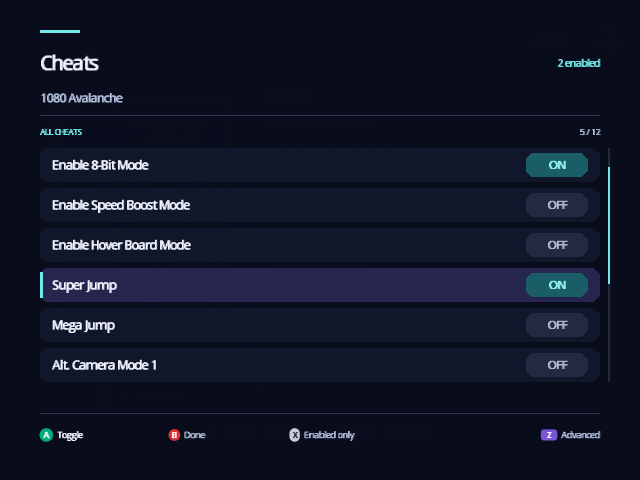
In the browser:
- The top right counts the cheats that are on, and the line above the list shows where you are in it, such as "5 / 12".
- X shows only the cheats that are on; X again shows them all.
- Z opens Advanced (below).
Indigo saves which cheats are on in a small .chtsel file beside the
game's cheat file, one per disc revision, so they're still on next time.
Cheats on a read-only device, such as a data disc, work but aren't saved.
Start with your cheats every time
Normally the cheats that are on apply when you start the game after opening the browser. Turn on Auto-load cheats in Settings › Quick and Indigo applies your saved cheats whenever the game starts, without opening the browser. It shows "Applied 3 cheats" (or however many) for a second as the game starts.
Advanced
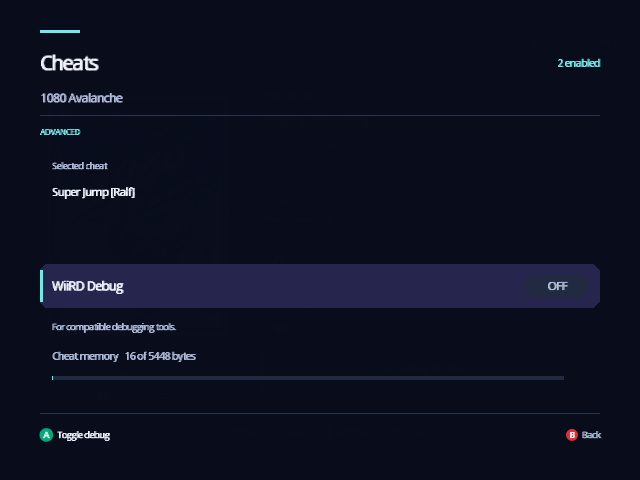
- Cheat memory shows how much of the space for cheats is used. All the cheats that are on share it; if it's full, Indigo says "Not enough room. Turn off another cheat first."
- WiiRD Debug starts the game with the WiiRD debugger, for compatible debugging tools. It uses cheat memory too.
B goes back to the list.
From docs/guide/cheats.md in Indigo v1.25.0, rendered for the web. Spotted a mistake? Suggest an edit.