
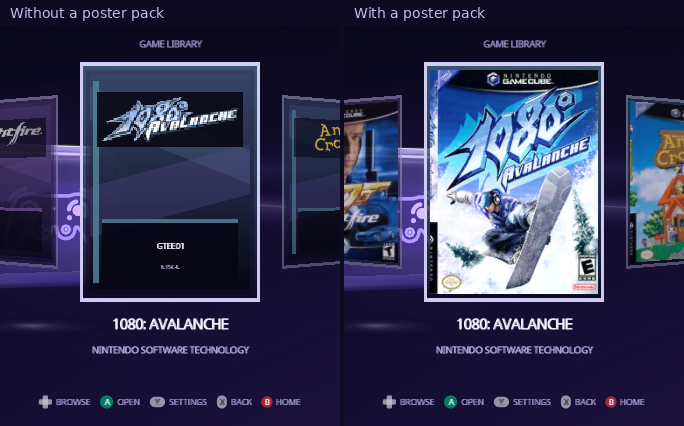
Posters are the box art in the Library and on each game's
details. They come from one file on your card,
/swiss/ui/posters.pak. It's optional: without it, each game shows its disc
banner and its six-character game ID.
Download a pack
Ready-made packs are made from GameTDB's cover art:
- Posters: USA & Japan (NTSC)
- Posters: Europe & Australia (PAL)
Unzip the one you want into the root of the card; it holds
swiss/ui/posters.pak. Indigo reads one pack at a time, so pick the region
most of your games are from. Checksums are in
SHA256SUMS.txt, and the
Indigo page has the details.
A game gets its poster when its game ID is in the pack. Games from the other region, and the few games GameTDB has no art for, keep their banner card.
Build your own pack
You can make a pack from your own cover images, from this repository:
-
Put the front covers in one folder, each named after its game ID, such as
GMSE01.pngorGALE01.jpg. They should be at least 192×256; Indigo crops them to 3:4 from the center. -
Build the pack. You need Python with Pillow, and Docker for the texture converter:
python3 -m pip install pillow
docker pull ghcr.io/extremscorner/libogc2@sha256:903b442dfd18cab00b5958726f70b17d95b0cf40c15d01b11e841825489dbe3d
python3 buildtools/ui/poster_pack.py --covers ~/covers --out posters.pak
Files that aren't named by a game ID are skipped and listed.
-
Copy
posters.pakto/swiss/ui/posters.pakon the card.
A pack holds up to 1,024 covers.
Where the game ID comes from
Every GameCube disc has a six-character ID: four for the game and region, two
for the publisher. Super Mario Sunshine for North America is GMSE01. A game
without a poster shows its ID on its card, and you can look up any game's ID
on GameTDB.
← Memory Cards · Troubleshooting →
From docs/guide/posters.md in Indigo v1.25.0, rendered for the web. Spotted a mistake? Suggest an edit.